State of Motion in AI-Generated UIs: 196 Sites Tested for Motion Accessibility (2026)
In short: we scanned 196 AI-generated production web apps in July 2026 for one narrow thing — does the motion they ship by default let a person stop it? — and re-measured them in September 2026 (192 online, 186 measurable). 65.1% of the measurable apps run at least one infinite animation with no way to pause it — loading indicators excluded — a WCAG 2.2.2 Level A failure. 96.8% ship motion with no reduced-motion guard. Two apps — 1.1% — came back clean; six more had no CSS motion at all and are reported as not measurable. The full method and the raw dataset are below, so you don't have to take our word for any of it.
Figures above: re-measurement of 2026-09-11. Earlier published figures were corrected on 2026-09-02 and superseded on 2026-09-11 — both notices follow in full, and every earlier figure stays listed in the revision record.
prefers-reduced-motion guards, colour/opacity transitions no longer counted as motion, loading indicators moved to manual review (WCAG 2.2.2 preload exception), and pages with no CSS motion at all reported as not measurable instead of clean. 192 apps were still online; 186 were measurable. On the per-app basis: 96.8% (180/186; 95% CI 93.1–98.5%, Wilson) ship at least one motion animation or transition with no reduced-motion guard (WCAG 2.3.3, a best-practice gap); 65.1% (121/186; CI 58.0–71.5%) run at least one infinite animation with no pause path, loading indicators excluded (WCAG 2.2.2, Level A); 1.1% (2/186) came back clean; 3.1% (6/192) had no CSS motion and are not measurable. Median score 35/100, median 13 distinct root causes per app. The July engine had counted colour transitions as motion and spinners as Level-A candidates, and had counted the 6 no-motion apps as clean; the old engine re-run on today’s HTML reproduces the July figures exactly, so the change is method, not drift. On the signature basis used since Sep 2 the figures are 96.2% / 57.1% / 1.0% of 105 distinct signatures. Static lower bound, convenience sample — unchanged caveats. Dataset v2 (CSV with a status column) is linked under method; every earlier figure stays in the revision record.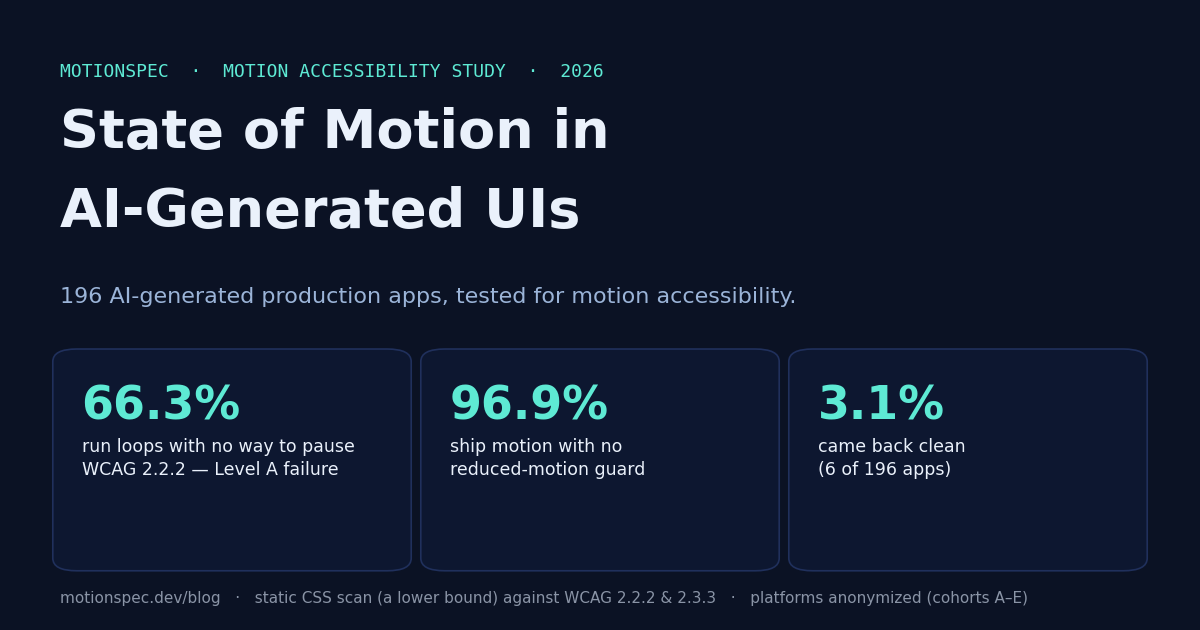
Somewhere right now, a person who gets motion sick from moving interfaces has told their computer to calm down. Every major operating system has the switch: Reduce Motion. It's not a preference in the decorative sense — for people with vestibular disorders, a parallax hero or an auto-scrolling marquee can trigger real dizziness, nausea and migraine. The web has a standard way to honour that switch. The question we set out to answer was simple: in the new wave of apps that AI builders generate for us, how many actually do?
We took 196 publicly accessible production apps built with five major AI app-builder platforms, and ran one focused check against the two oldest, most automatable motion-accessibility rules on the books: is there a reduced-motion guard, and is there a way to pause a loop that never stops? Mostly, the answer was no. What follows is the data, why this particular gap stays invisible to the tools most teams already run, and — because it's genuinely fixable in minutes — what to do about it.
On this page
- Key findings
- By cohort — and the one that got it right
- Why this gap stays invisible
- Why it matters now
- Whose job is this?
- The fix is small
- How we measured (read before quoting)
- FAQ · Cite this study
Key findings
- 65.1% of 186 measurable apps fail WCAG 2.2.2 (Level A). Just under two-thirds of the measurable apps ran at least one infinite, auto-playing animation with no pause, stop, or hide path — loading indicators excluded (WCAG 2.2.2 preload exception). Level A is the minimum bar — the one everyone is meant to clear.
- 96.8% of 186 measurable apps ship unguarded motion. Nearly every measurable app had some motion animation or transition with no
prefers-reduced-motionguard. We're deliberately careful here: this is a best-practice gap, not a strict Level A/AA failure (see method). It's the ambient problem; the 65.1% is the hard one. - The median measurable app carried 13 distinct motion root causes. Not 13 CSS selectors — 13 separate causes, each an animation or an unguarded transition layer.
- The median motion score was 35 out of 100 on our own heuristic (see the caveat below). Across the measurable corpus, 3 apps scored 100 — two of them clean, one with nothing left but a loading indicator for manual review.
- Only 2 of 186 measurable apps were clean — both with a universal prefers-reduced-motion reset (one in cohort C, one in cohort E). The 6 apps we had called clean in July had no CSS motion at all; they now count as not measurable.
The 0–100 "motion score" is MotionSpec's own weighting heuristic, not a WCAG conformance rate. We report it because it's reproducible (the formula ships with every result), but the load-bearing numbers here are the WCAG-mapped percentages, not the score.
By cohort — and the one that got it right
We grouped the apps into five anonymized cohorts, A–E, one per platform. The pattern is stark, and it points somewhere useful.
| Cohort | Apps (measurable) | ≥1 unguarded motion | ≥1 infinite loop, no pause | Median root causes | Median score |
|---|---|---|---|---|---|
| A | 45 (45) | 100% | 73.3% | 13 | 35 |
| B | 45 (45) | 97.8% | 77.8% | 14 | 35 |
| C | 45 (44) | 95.5% | 77.3% | 15 | 35 |
| D | 21 (21) | 90.5% | 52.4% | 4 | 66 |
| E | 40 (31) | 96.8% | 25.8% | 11 | 63 |
September 2026 method, per app. Percentages are shares of the measurable apps in each cohort; “Apps” shows collected (measurable) — cohort C has one app offline, cohort E three offline and six with no CSS motion at all. Cohort D is the smallest (21 apps), so its percentages carry wider uncertainty than the others. Full per-app data is in the linked datasets.
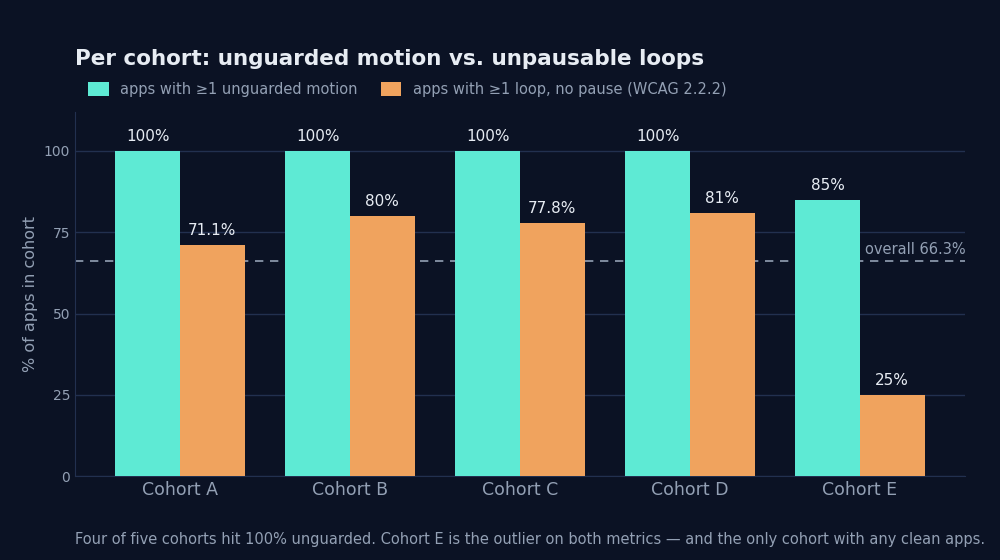
Every cohort sits between 90% and 100% on the unguarded-motion check. That near-uniformity is the tell: this isn't a few careless builders, it's a default. But cohort E breaks the pattern on the hard failure — a loop-with-no-pause rate of 25.8%, roughly a third of its peers' — and the only two clean apps sit in cohorts C and E, each with a universal reduced-motion reset. That matters more than any single headline number, because it means the gap is not a technical ceiling. Somewhere, a platform's design-system defaults already ship a reduced-motion guard often enough to move the numbers. If one can, the rest can.
Why this gap stays invisible
Here's the uncomfortable thing: most of these apps would pass the accessibility scan a careful team actually runs. That's not because the scanners are bad — it's because they don't look at motion.
The most authoritative snapshot of the field, the WebAIM Million, analyses the top one million home pages every year. Its 2026 report found detectable WCAG failures on 95.9% of them and flagged the first accessibility regression in seven years — pinning part of it on the rise of AI-assisted "vibe coding." But look at what it measures: the recurring top failures are low-contrast text, missing alt text, empty links and buttons, missing form labels, missing document language. Motion is not on the list — not because it's rare, but because the automated scanners behind studies like that (and behind axe, WAVE and Lighthouse) don't reliably evaluate animation. Visual-regression tools go further in the wrong direction: they freeze animation on purpose so they can diff screenshots.
So the honest framing is not "motion is the biggest accessibility problem." It isn't. Contrast and alt text are the epidemic; fix those first. Motion is a different kind of problem — the one the standard tooling can't see, which is exactly why it keeps shipping on sites that otherwise pass. It's not the largest gap. It's the invisible one. And an AI builder that was never asked about reduced motion will reproduce it a thousand times without a warning.
Why it matters now
Three things are converging in 2026, and together they turn an old, quiet gap into a live one.
Motion just became everyone's job. Figma shipped Figma Motion at Config 2026 — a native timeline plus an AI agent that generates animation from a prompt, on every plan. Figma's own recap adds the caveat in the same breath: motion in the tool "does not replace reduced-motion preferences or contrast checks." More motion, made by more people, faster — with no enforcement in the tool that makes it.
AI is generating the unsafe version at scale. That's what our 196 apps show, and what WebAIM's regression hints at from the other direction. The default output of a generation pipeline that was never prompted about accessibility is motion with no brake.
And the law is starting to bite — carefully stated. The European Accessibility Act’s requirements have applied since 28 June 2025 (Directive (EU) 2019/882). On 4 June 2026, a French court (the Carrefour case) issued what's regarded as the first EAA enforcement decision: an order to fix within six months or pay €500 per day. To be precise, because this gets exaggerated: that is a court order with a daily penalty, not one of the "€900k–€1M fines" that circulate online — those are statutory maximums, not sums anyone has actually been made to pay. The enforcement is real; the million-euro headline is not yet.
Whose job is this?
It's tempting, from where we sit, to point at the builders. We're not going to — partly because it wouldn't be fair, and partly because it wouldn't be true. The people using these tools aren't careless, and the tools aren't malicious. The gap exists because the whole chain optimised for shipping something that looks alive, and nobody in it was ever asked to also let it stop.
Every AI learned to make the web move. Almost none learned to let it stop. That includes us: we shipped unguarded motion ourselves before we started measuring it — which is the whole reason we can tell you where to look.
— Kevin Fröba, MotionSpec
The accessibility community has been clear for years about who this affects and why — writers like Tatiana Mac, who argues for a "no-motion-first" default, and Val Head, whose work on motion sensitivity predates the tooling that now makes the problem worse. The point of a study like this isn't to relitigate the "should." It's to measure the "is," and to make the gap legible to the people now generating motion who never saw those articles. An OS-level Reduce Motion setting only helps if the page listens for it — and, ideally, offers its own visible pause too.
The fix is small
None of this is exotic. It's the default output of tools that were never asked the question — and it's fixable in minutes once it's visible. Two patterns cover most of what we found.
1. Guard non-essential motion. Honour the reduced-motion request (full walkthrough and testing steps in our prefers-reduced-motion guide):
@media (prefers-reduced-motion: reduce) {
  *, *::before, *::after {
    animation-duration: .01ms !important;
    animation-iteration-count: 1 !important;
    transition-duration: .01ms !important;
    scroll-behavior: auto !important;
  }
}
That's a blunt safety net; a real implementation guards specific animations rather than blanket-killing them, but even the net is better than nothing. 2. Give loops an off switch. Anything that loops forever needs a pause control or a finite end — an animation-play-state: paused tied to a visible button, or simply a bounded animation-iteration-count. That single change is what moves a page out of that 65.1%.
Paste any URL into the free motion check — the same static scan we ran here, against WCAG 2.2.2 and 2.3.3, every finding with its fix, in about ten seconds. No signup, nothing stored. Honest scope: static CSS only; it's a lower bound, not a full accessibility audit or a compliance verdict.
Check a page for freePrefer a citable number? The $29 Motion Report gives your site where its score sits among the 186 of these apps we could measure — a dated HTML report at a private link (print or save as PDF), WCAG 2.2.2/2.3.3 citations, fix snippets. See a real example report →. Fourteen‑day refund, no questions asked.
How we measured (read before quoting)
This is a static scan of each page's linked CSS and inline <style> blocks — nothing else. That makes every number above a lower bound, not a ceiling, and we want to be specific about the edges:
- Runtime JavaScript motion is not measured. GSAP, the Web Animations API, scroll-driven libraries — anything animated through
.animate()or a JS timeline is invisible to this scan. The true rate is very unlikely to be lower than what we report. - One page per app. We visited each app's public entry page only; deeper routes weren't crawled.
- Corpus. 196 apps, 21–45 per cohort, collected 2026-07-16 from official galleries, platform homepages and search-indexed hosting domains. Every URL has recorded provenance;
robots.txtwas respected; login-walled apps were excluded. Showcase corpora over-represent small and demo apps — a known bias we're naming, not hiding. - Re-measurement 2026-09-11. Same corpus, same fetch limits (12 stylesheets, 2 MB, 10 s per page), engine rules rev. 2026-09-11 (the scoring document ships in every API response). 4 apps were offline (1× HTTP 404, 2× timeout, 1× DNS); 6 apps showed no CSS motion at all in the loaded stylesheets and are reported as not measurable, not clean. Colour, opacity and shadow transitions no longer count as motion; loading indicators (spinners, progress bars) are listed for manual review under the WCAG 2.2.2 preload exception and score 0; universal
prefers-reduced-motionresets are recognised cascade-aware. The July engine re-run on the September HTML reproduces the July aggregates exactly — the change is method, not drift. - What maps to what. Reduced-motion guards and risky animated properties sit in WCAG 2.3.3 (Animation from Interactions) territory; pause paths for infinite or long autoplay motion map to WCAG 2.2.2 (Pause, Stop, Hide, Level A). Neither criterion is fully machine-checkable — whether a given motion is "essential" is a human judgment no scanner can make — so what we report are automatable failure patterns within each criterion, not a conformance verdict, and not a legal determination for any app, platform or company.
One objection we expect: that our cohort groupings and score weights are self-defined heuristics. Fair. Every number here is a pure function of published, reproducible rules — the scoring formula ships with every result at motionspec.dev/motion-check — and the full corpus, per-app results and both scorer versions are archived and re-runnable on demand. The anonymized, per-app dataset (no URLs, no platform names) is published under CC-BY-4.0:
Download the dataset — July 2026 (CSV, 196 rows) · September 2026 re-measurement (CSV, 196 rows, with a status column) →
FAQ
Are AI-generated websites accessible for motion?
In our September 2026 re-measurement of 196 AI-generated production apps (192 online, 186 measurable), 65.1% of the measurable apps ran at least one infinite animation with no way to pause it — loading indicators excluded — a WCAG 2.2.2 Level A failure — and 96.8% shipped motion with no reduced-motion guard. 1.1% came back clean; 3.1% had no CSS motion at all and are not measurable. It's a static lower bound, not a full audit.
What is WCAG 2.2.2 Pause, Stop, Hide?
WCAG 2.2.2 is a Level A success criterion: any motion that starts automatically, runs more than five seconds, and plays alongside other content must give people a way to pause, stop, or hide it. An infinite loop with no pause control fails it. Level A is the minimum accessibility bar.
Is missing prefers-reduced-motion a WCAG failure?
Not on its own. Missing prefers-reduced-motion support maps to WCAG 2.3.3, a Level AAA criterion scoped to interaction-triggered motion — best practice, not a strict A or AA failure. We report it as a coverage gap. The hard failure in our data is the 65.1% under 2.2.2 Level A.
How was the study measured?
We ran a static scan of each app's linked CSS and inline styles — nothing else. That makes every number a lower bound: runtime JavaScript motion such as GSAP, WAAPI and scroll libraries is not measured, and only the public entry page was visited. The full method and the raw dataset are linked in the article.
Which AI builders were tested?
Five major AI app-builder platforms, 21 to 45 apps each, 196 in total — 192 still online and 186 measurable at the September 2026 re-measurement. We don't name which is which — apps appear only as cohorts A to E. The point is the pattern across a category of tools, not a scoreboard for any one vendor, and per-app identities stay private.
How do you fix unguarded motion?
Wrap non-essential motion in a prefers-reduced-motion media query so it reduces or stops when the user asks, and give anything that loops a pause control or a finite end. Both are a few lines of CSS. You can scan any URL free at motionspec.dev/motion-check to see the specific fixes.
Revision record
Every set of figures this study has published, with the date it went up and the date it came down. If you cited an earlier number, this is where it stays findable.
| Date | Status | Figures as published |
|---|---|---|
| 2026-07-18 | published | Per app, n=196: 66.3% ran infinite motion with no pause path (WCAG 2.2.2, Level A); 96.9% shipped motion with no reduced-motion guard (WCAG 2.3.3); 3.1% clean. |
| 2026-08-05 | withdrawn 2026-09-02 | Replaced by ranges: 53.9–77.2% (2.2.2), 90.1–100% (2.3.3) and 0–9.9% clean, stated as shares of distinct motion signatures. Not reproducible from the published dataset, and not expressible as a proportion on either denominator — withdrawn on 2026-09-02. |
| 2026-09-02 | superseded 2026-09-11 | Per distinct motion signature, n=124 (from the same 196 apps): 61.3% (76/124; 95% CI 52.5–69.4%, Wilson), 99.2% (123/124) and 0.8% (1/124) clean. |
| 2026-09-11 | current | Per app, September 2026 method, n = 186 measurable of 192 online: 65.1% (121/186; 95% CI 58.0–71.5%, Wilson) infinite motion with no pause path, loading indicators excluded; 96.8% (180/186) motion with no reduced-motion guard; 1.1% (2/186) clean; 3.1% (6/192) not measurable. Signature basis: 105 signatures, 57.1% / 96.2% / 1.0%. |
Corpus and the July CSV are unchanged across the first three revisions — only the figures derived from them changed. The 2026-09-11 row is a re-measurement of the same corpus with the September 2026 method and has its own CSV; the cohort table above carries those figures.
Cite this study
Free to reuse under CC-BY-4.0 with attribution.
APA. Fröba, K. / MotionSpec. (2026). State of Motion in AI-Generated UIs: 196 sites tested for motion accessibility (Motion Accessibility Index #1). https://motionspec.dev/blog/state-of-motion-ai-generated-uis
@misc{motionspec2026stateofmotion,
  title  = {State of Motion in AI-Generated UIs: 196 Sites Tested for Motion Accessibility},
  author = {Fröba, Kevin and {MotionSpec}},
  year   = {2026},
  note   = {Motion Accessibility Index #1},
  howpublished = {\url{https://motionspec.dev/blog/state-of-motion-ai-generated-uis}}
}
Related: prefers-reduced-motion, explained (and how to test it) →